Architecture
Overview
This document outlines the high-level architecture of the GreenWave system, a smart traffic management solution based on the FIWARE ecosystem. The system leverages traffic simulation, real-time context management, historical data persistence, and Artificial Intelligence to optimize traffic flow and provide actionable insights.
Architecture Diagram
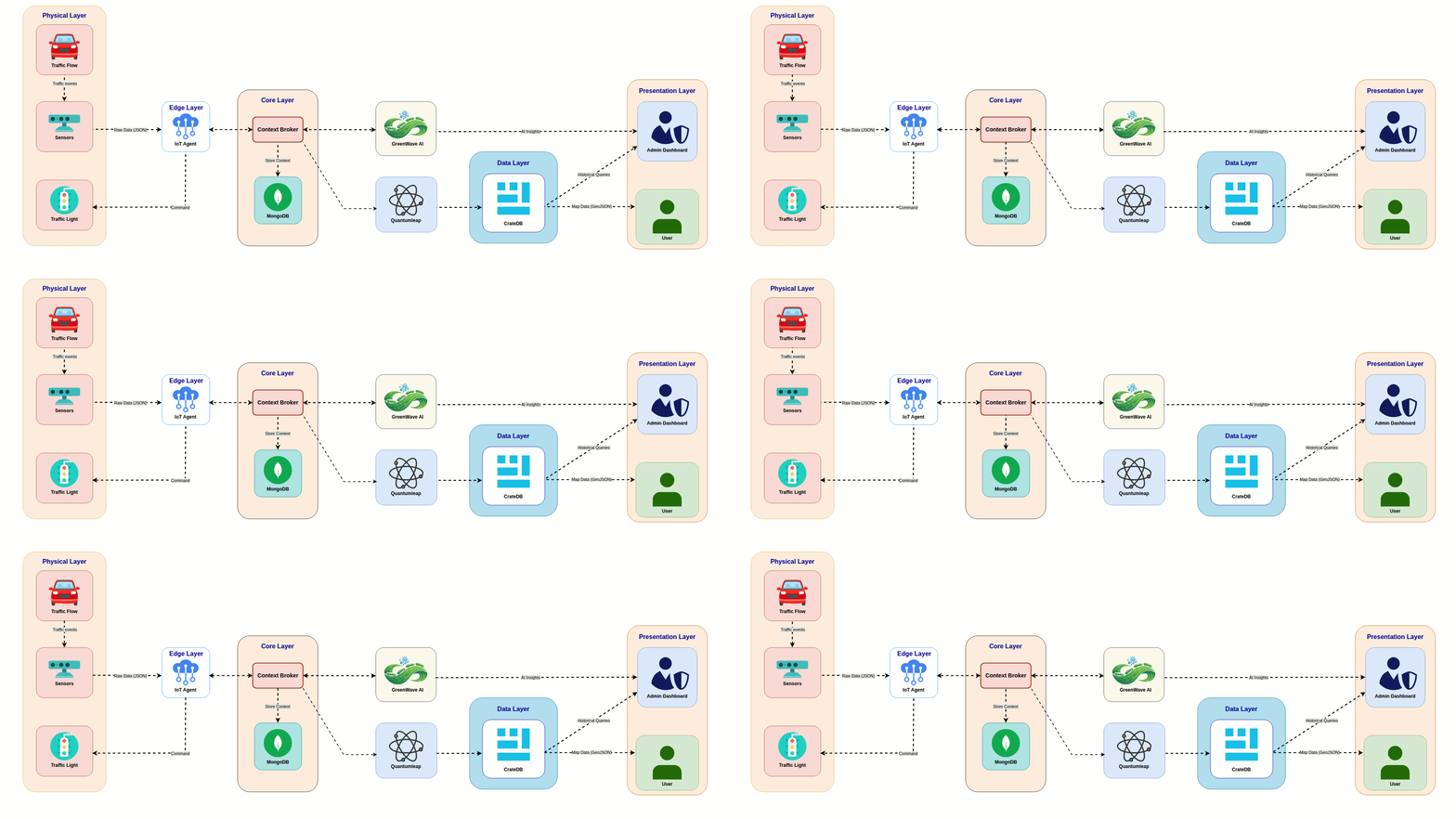
Component Layers
The architecture is modular, following a layered approach to ensure scalability and separation of concerns.
1. Simulation & Device Layer
SUMO (Simulation of Urban MObility):
- Acts as the data source for the system.
- Simulates real-world traffic scenarios, generating telemetry data such as vehicle position, speed, and CO2 emissions.
- In a production environment, this component would be replaced or augmented by physical IoT sensors and traffic cameras.
2. Edge & Ingestion Layer
IoT Agent (Northbound):
- Serves as the gateway between the data source (SUMO) and the core platform.
- Standardizes raw data from the simulation into the NGSI-LD format required by the Context Broker.
- Handles the mapping of device attributes to logical entities.
3. Core Context Management Layer
Orion-LD Context Broker:
- The central component of the architecture, functioning as the "brain" of the system.
- Manages the lifecycle of context information (entities) using the NGSI-LD standard (Linked Data).
- Implements a Publish/Subscribe mechanism to notify other components (AI, History Service) whenever context data changes.
MongoDB:
- The backend storage for the Context Broker.
- Stores only the current state of entities (e.g., the current location of a vehicle). It does not persist historical data.
4. Intelligence Processing Layer
GreenWave AI:
- A custom service containing Machine Learning models (Reinforcement Learning agents).
- Subscribes to specific events from Orion-LD.
- Processes real-time data to traffic light control commands.
- Sends analysis results directly to the Admin Dashboard for visualization.
5. Historical Data Layer
Quantum Leap:
- A generic enabler specifically designed for time-series data persistence.
- Receives notifications from Orion-LD and converts the NGSI-LD payload into a format suitable for time-series databases.
CrateDB:
- A distributed SQL database optimized for massive amounts of IoT and time-series data.
- Stores the historical records of all traffic metrics, enabling temporal queries (e.g., "Show traffic density over the last 24 hours").
6. Presentation Layer
Admin Dashboard (React):
- The control center for system administrators.
- Fetches historical analytics from CrateDB.
- Displays real-time insights and recommendations provided by the GreenWave AI engine.
User Map (React):
- A client-facing application providing traffic visualization.
- Queries CrateDB to render heatmaps and traffic flows based on historical and recent data.
Data Flow Description
The system operates on an event-driven architecture. The data flows through the system in the following sequence:
- Data Generation: SUMO generates traffic simulation data (vehicle coordinates, speed, acceleration) and sends it to the IoT Agent.
- Normalization: The IoT Agent receives the raw data, converts it into NGSI-LD entities, and updates the Orion-LD Context Broker via HTTP requests.
- Context Update & Storage: Orion-LD updates its internal state. The latest values are immediately persisted in MongoDB. At this stage, the system knows exactly what is happening right now.
- Notification (The Branching Point): Upon updating the context, Orion-LD triggers asynchronous notifications to subscribers:
- Path A (To History): A notification is sent to Quantum Leap. Quantum Leap formats the data and inserts a new time-stamped record into CrateDB.
- Path B (To AI): A notification is sent to GreenWave AI. The AI engine analyzes the new state (e.g., detecting a bottleneck) and computes an optimization strategy.
- Visualization & Analysis:
- The Admin Dashboard and User Map execute SQL queries against CrateDB to retrieve historical trends and visualize traffic patterns over time.
- Simultaneously, the Admin Dashboard receives the processed insights directly from GreenWave AI to display alerts or suggested actions to the operator.